



🛒 E-commerce Integration
E-commerce Integration with TallyPrime: Connect Online Orders and Accounting
Manage online orders, product information, inventory and accounting through a more structured workflow.
Running an e-commerce business involves more than receiving orders. Every order may affect inventory, sales records, customer information, invoices, returns and accounting.
When an online store and TallyPrime operate separately, employees may need to download order reports, match product details, create accounting entries and update records manually. As order volumes grow, this process can become difficult to maintain consistently.
E-commerce integration with TallyPrime helps businesses connect their online selling platforms with their accounting workflow. Depending on the platforms and integration design, relevant information can be transferred, validated and processed with less repetitive manual handling.
This guide explains how e-commerce integration works, which data can be connected, what businesses should consider before implementation, and how to plan a reliable order-to-accounting workflow.
Quick Answer: What Is E-commerce Integration with TallyPrime?
E-commerce integration with TallyPrime connects an online selling platform or marketplace with TallyPrime so that selected business information can move between the systems through a suitable integration method.
A typical workflow looks like this:
Depending on the business requirements, the integration may handle:
- Online order information
- Customer and billing details
- Product codes and SKU mapping
- Item quantities and prices
- Discounts and shipping charges
- Sales transactions and invoice-related data
- Inventory information
- Order cancellations and returns
- Supporting payment or settlement references
The exact information, synchronization frequency and accounting treatment depend on the platform, available interfaces, business process and TallyPrime configuration.
The purpose is to create a consistent flow of information between online sales operations and accounting—not simply to transfer every order into TallyPrime without validation.
Why Do E-commerce Businesses Connect TallyPrime with Their Online Stores?
An online business may receive orders from its website, marketplaces and other sales channels while maintaining its accounting records in TallyPrime.
If these systems are not connected, teams may have to manage separate datasets and reconcile them periodically.
1. Repeated Order Entry
Employees may download order details and enter them into the accounting system one by one. A suitable integration can reduce repeated data entry for supported order types, provided the required fields and business rules are defined.
2. Product and SKU Mismatches
The same product may have different identifiers or descriptions across the online store and accounting system. For example, an online store may use a product SKU while TallyPrime uses a stock item name or code. Without a reliable mapping rule, the integration may associate an order with the wrong item or fail to process it.
A structured mapping process helps define how online products correspond to TallyPrime stock items.
3. Inventory Differences Across Channels
A product may be sold through several channels while stock is maintained in TallyPrime or another inventory system. Without a defined synchronization process, available stock information may differ across platforms.
Integration planning should identify which system is the inventory source of truth, how stock updates are handled and how synchronization delays or failed updates are managed.
4. Inconsistent Sales Records
Online orders can include different prices, discounts, shipping charges, taxes and order statuses. If these elements are mapped incorrectly, the resulting accounting records may not reflect the intended transaction.
The integration should define the treatment of each relevant field before automatic processing begins.
5. Returns and Cancellations
An order may be cancelled before dispatch, returned after delivery or partially refunded. These events can require different operational and accounting actions. A reliable workflow should distinguish them instead of treating every status change as a new sale or automatically reversing the original transaction without review.
How Does E-commerce Integration with TallyPrime Work?
A typical implementation includes several stages.
1Collect Order Information
Obtain relevant information from the online store or marketplace through an available API, connector, structured file or another supported method.
2 Match Products and Customers
Map online records to the appropriate TallyPrime masters. Handle new customers, missing products, duplicate records and unmatched data explicitly.
3 Validate the Order
Check required fields, duplicate order IDs, product mapping, quantities, amounts, order status, tax and discount information.
4 Transform the Data
Convert relevant data into the format required by the target system through date formatting, item mapping, customer mapping and amount validation.
5 Process the Agreed Workflow
Create the appropriate record according to the agreed workflow—sales order, sales voucher, invoice-related records or another supported transaction.
6 Track Synchronization Results
Record whether each order was processed successfully, is awaiting processing or requires attention. Identify failed attempts, unmapped products and duplicates.
Important: Not every online order should automatically become a final accounting entry. The correct treatment depends on the business's accounting policy and transaction lifecycle.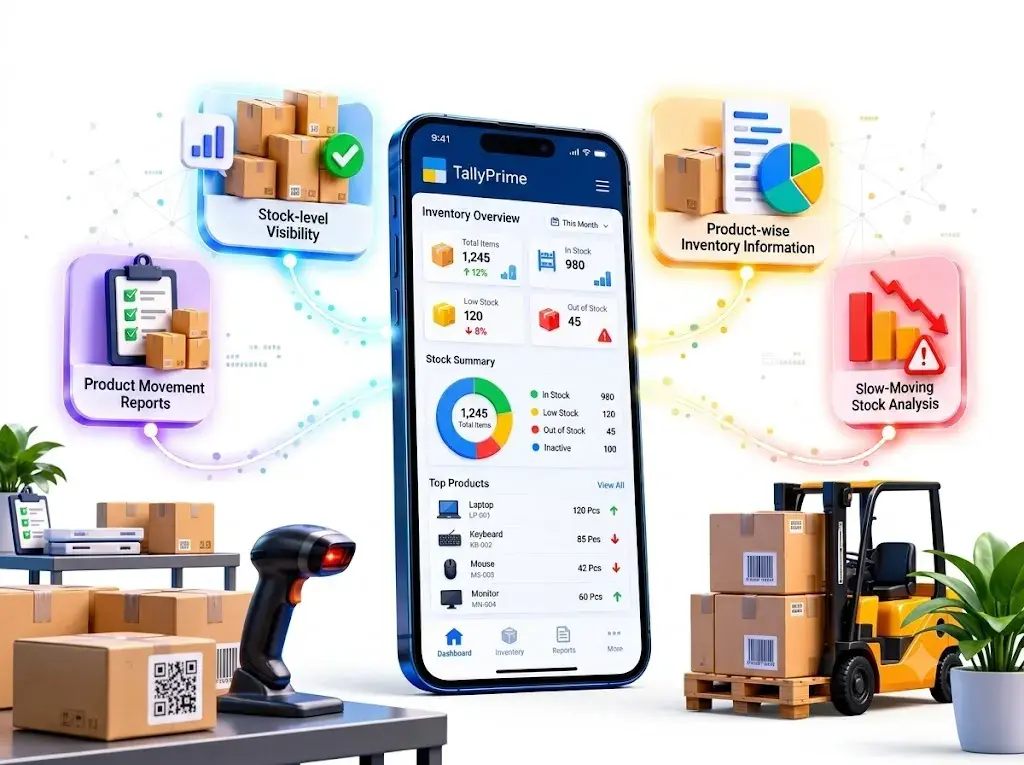
What Data Can Be Integrated from an E-commerce Platform?
The following table illustrates common data categories and their potential uses.
| Data Category | Potential Use in TallyPrime Workflow |
|---|---|
| Order ID | Track and identify online orders |
| Order Date | Apply the agreed transaction date |
| Customer Information | Map customers to appropriate records |
| Product SKU | Match online products with stock items |
| Quantity | Transfer ordered quantities |
| Selling Price | Map item pricing according to agreed rules |
| Discount | Apply the defined discount treatment |
| Shipping Charge | Map applicable shipping-related charges |
| Tax Information | Apply the agreed tax mapping |
| Order Status | Determine whether an order is eligible for processing |
| Return Information | Support the defined return workflow |
| Payment Reference | Support payment matching when required |
The availability and meaning of each field vary by platform. Before development, the business should confirm which data is available and how each field should be interpreted.
Shopify to TallyPrime Integration
Businesses using Shopify may want their online store orders and product information to connect with TallyPrime.
A possible workflow is:
Depending on the technical scope, the integration may be designed to handle:
- New order information
- Product SKU mapping
- Customer details
- Item quantities and prices
- Discounts and shipping fields
- Order status conditions
- Selected inventory workflows
- Returns and cancellations
The implementation should account for the specific Shopify store configuration and available integration methods. For example, the business must decide whether orders are processed when they are placed, paid, fulfilled or reach another defined status. This decision affects duplicate handling, cancellations and the accounting workflow.
WooCommerce to TallyPrime Integration
WooCommerce stores may need to connect website orders with their accounting and inventory processes.
A potential workflow is:
Depending on the website setup, relevant requirements may include:
- Order IDs and order status
- Customer and billing information
- Product SKUs
- Quantities and prices
- Discounts and shipping charges
- Tax information
- Refund and cancellation data
- Inventory-related updates
WooCommerce sites can use different plugins, extensions and custom configurations. The available integration method should be checked against the actual website rather than assumed to be identical for every store.
Amazon, Flipkart and Other Marketplace Integration
Marketplace sellers may receive orders through several platforms while maintaining accounting records in TallyPrime.
A suitable integration plan should consider the differences between individual marketplaces and the seller's own website.
Potential requirements include:
- Marketplace order identifiers
- Product and SKU mapping
- Item-level order information
- Seller and customer-related records where available
- Marketplace fees and adjustments
- Returns and cancellations
- Settlement and payout references
- Channel-wise sales reporting
Marketplace order values and payout amounts are not always the same. Fees, returns, adjustments and settlement timing may affect the amount received. Order-to-accounting integration and payment reconciliation should therefore be designed as related but distinct workflows.
How Should Product SKU Mapping Be Planned?
Product mapping is one of the most important parts of e-commerce integration.
Consider an online store selling three products:
| Online SKU | TallyPrime Stock Item | Mapping Status |
|---|---|---|
| SKU-1001 | Product A | ✓ Matched |
| SKU-1002 | Product B | ✓ Matched |
| SKU-1003 | Not yet identified | ⚠ Requires Review |
If SKU-1003 has no valid mapping, the integration should not guess which stock item to use.
A structured product mapping process should establish:
- Which field uniquely identifies each product
- How variants, sizes and colours are represented
- How duplicate or inactive products are handled
- How new SKUs are approved and mapped
- What happens when a product cannot be matched
- Who is responsible for resolving mapping errors
This helps protect data quality and reduces the risk of incorrect stock or accounting records.
Inventory Synchronization: What Should Businesses Decide?
Inventory synchronization can be more complicated than transferring an order.
A business may maintain inventory in TallyPrime, its e-commerce platform, a warehouse system or a combination of systems.
Before implementation, decide:
- Which system controls stock? Define the authoritative source for inventory quantities.
- When should stock change? Establish whether the relevant event is order placement, confirmation, dispatch, cancellation or another milestone.
- How are multiple warehouses handled? Define location mapping where stock is maintained across different godowns or warehouses.
- How are failed updates managed? Create a process to retry or review unsuccessful synchronization.
- How are returns handled? Define when returned items are inspected and when they become available stock again.
- How are overselling risks addressed? Account for update delays and simultaneous orders across multiple channels.
The correct design depends on the inventory system, business rules and available integration capabilities. Integration alone does not guarantee that all channels will always display identical stock at every moment.
Handling Order Cancellations, Returns and Refunds
A complete integration plan should cover the full order lifecycle rather than only successful sales.
Order Cancellation
An order cancelled before accounting processing may require no sales entry, depending on the workflow. If the order has already been recorded, the cancellation may require a separate action according to the accounting policy.
Product Return
A return after dispatch or delivery may affect stock, sales records and customer balances. The business should define the conditions for processing a return, including inspection and restocking requirements where relevant.
Refund
A refund is a financial event that should be handled according to the original transaction and applicable accounting rules. A refund should not automatically be treated as equivalent to a stock return: a customer may receive a refund without the product being returned, or a product may be returned before the refund is completed.
Partial Returns
When only part of an order is returned, the integration must identify the relevant items and quantities and follow the agreed accounting process.
These scenarios should be tested before deployment.
E-commerce Integration vs Payment Gateway Integration
E-commerce integration and payment gateway integration are related, but they solve different problems.
| Area | E-commerce Integration | Payment Gateway Integration |
|---|---|---|
| Primary Purpose | Connect online order and product workflows with accounting | Connect payment transactions and related accounting workflows |
| Typical Information | Orders, SKUs, quantities, customer details, status | Payment references, payment status, fees, refunds and settlements |
| Inventory Relevance | Often central to the workflow | Usually indirect |
| Main Validation Focus | Order, product and transaction mapping | Payment matching and reconciliation |
| Typical Exception | Unmapped SKU or duplicate order | Unmatched payment or settlement difference |
Some businesses need both integrations. Others may require only one, depending on how their store, payments and accounting are currently managed.
For a deeper discussion of payment matching and settlements, read our TallyPrime Payment Gateway Integration guide.
Common E-commerce Integration Mistakes
1. Creating Duplicate Sales Records
An integration may receive the same order more than once because of retries or repeated synchronization. Use a reliable order identifier and duplicate-detection rules before creating records.
2. Mapping Products Only by Name
Product names can change or be similar across variants. Use a defined mapping strategy, such as a unique SKU or another stable identifier, and review unmatched products.
3. Ignoring Order Status
An order placed, paid, dispatched and returned may require different actions. Define which statuses trigger each processing step.
4. Treating the Order Total as the Payout
Marketplace fees, shipping adjustments, refunds and other settlement differences can affect the final payout. Keep order accounting and payout reconciliation distinct.
5. Ignoring Tax and Discount Rules
Incorrect mapping of discounts, shipping or tax fields can create differences between online orders and accounting records. Confirm the relevant rules with the responsible finance professional before automating them.
6. Failing to Log Errors
Without error logs, teams may not know which orders failed to synchronize. Maintain processing status, error details and a clear resolution process.
7. Automating Before Testing
Test normal orders, cancellations, partial returns, duplicate events, unmapped products and failed synchronization before the live rollout.
How to Implement E-commerce Integration with TallyPrime
1 Review the Existing Setup
Identify the e-commerce platform, TallyPrime environment, order volume, inventory source and current accounting process.
2 Define the Scope
List the required platforms, data fields, order statuses, synchronization direction and accounting outcomes.
3 Review Technical Options
Assess the platform's available APIs, connectors, export methods and the supported connection options for TallyPrime.
4 Map the Data
Define how customers, products, orders, taxes, discounts and other required fields correspond between systems.
5 Establish Validation Rules
Specify duplicate detection, required fields, unmatched records, retry behaviour and exception handling.
6 Test Representative Scenarios
Test regular orders and relevant exceptions before allowing the workflow to process live transactions.
7 Deploy and Monitor
Introduce the agreed workflow and monitor synchronization results, errors and reconciliation differences.
8 Review and Improve
Review recurring exceptions and update mappings or business rules when the underlying processes change.
Benefits of E-commerce Integration with TallyPrime
A well-designed integration may help businesses:
📉 Reduce Repeated Order Entry
Less manual data transfer between systems.
🔗 Standardize Product & Customer Mapping
Consistent identifiers across platforms.
✅ Improve Consistency
Order data aligned with accounting records.
🔍 Identify Sync Failures
Easier monitoring of failed synchronizations.
📦 Structured Inventory Workflows
More organized stock updates.
📊 Reduce Spreadsheet Handling
Fewer repetitive manual reports.
👁️
Visibility Into Online Sales
Better oversight of order operations.
🔄
Repeatable Order-to-Accounting Process
Standardized workflow across channels.
Actual results depend on the current workflow, data quality, integration design and ongoing maintenance. Integration should be evaluated against the business's specific operational needs rather than assumed to eliminate every manual task.
Is E-commerce Integration Right for Your Business?
Integration may be worth evaluating if your business:
- Processes recurring online orders
- Sells through multiple online channels
- Repeatedly enters orders into TallyPrime
- Maintains separate product records across systems
- Needs a defined approach to returns and cancellations
- Requires more consistent order-to-accounting processing
- Spends substantial time reviewing synchronization differences
A small business with very few orders may be adequately served by a controlled manual process or a simpler import workflow. The right approach depends on order volume, complexity, error risk and the cost of maintaining the solution.
Frequently Asked Questions
1. What is e-commerce integration with TallyPrime?
It connects an online store or marketplace with TallyPrime so that selected order, product and related business information can be exchanged through a suitable integration method.
2. Can Shopify be integrated with TallyPrime?
Shopify integration can be evaluated based on the required workflow, available technical interfaces, product structure and TallyPrime environment.
3. Can WooCommerce be integrated with TallyPrime?
WooCommerce integration may be possible using a suitable connector, API-based workflow or other supported method, depending on the site's configuration and requirements.
4. Can Amazon or Flipkart orders be transferred to TallyPrime?
Marketplace order integration can be assessed according to the marketplace's available data, seller configuration, mapping requirements and accounting workflow.
5. Can online orders automatically create sales records?
A workflow can be designed to process eligible orders into the appropriate TallyPrime records. The event that triggers processing and the accounting treatment must be defined before implementation.
6. Can e-commerce integration update inventory?
Inventory updates can be included where the systems, data and workflow support them. The business must define the inventory source of truth, update timing and exception handling.
7. How are product SKUs mapped to TallyPrime?
A mapping table or equivalent rule associates each online SKU with the appropriate TallyPrime stock item. Unmatched or ambiguous products should be flagged for review.
8. Can cancellations and returns be handled?
They can be included in the integration design, but the exact workflow depends on order status, stock handling, refund rules and accounting requirements.
9. Is payment gateway integration the same as e-commerce integration?
No. E-commerce integration focuses on online order and product workflows. Payment gateway integration focuses on payment transactions and related reconciliation. A business may need both.
10. Does every order need to become a TallyPrime invoice?
Not necessarily. The appropriate accounting action depends on the business process, order lifecycle and accounting policy. The integration should follow the agreed rules.
11. How much does e-commerce integration with TallyPrime cost?
Cost depends on the platform, number of channels, required fields, order volume, inventory rules, return handling, custom development and testing. A scope review is needed before estimating the project.
12. How long does implementation take?
The timeline depends on technical access, data readiness, platform complexity, mapping requirements and testing. It should be estimated after the scope has been reviewed.
Connect Your Online Store with TallyPrime
Your e-commerce platform manages online orders, while TallyPrime supports your accounting workflow. A suitable integration can help connect these systems through defined data mapping, validation and transaction-processing rules.
Pragyantra can help assess your current setup, identify the required data flow and determine an appropriate integration approach for your business.
Tell us which platform you use, how orders are currently recorded and which steps you want to simplify.
Explore Related Resources
🏢 Pragyantra Solutions | Phone: +91 77280 57558 | Web: www.pragyantra.com