


ERP API Integration with TallyPrime: How to Connect ERP Systems with Tally
Modern businesses often use multiple software systems to manage different parts of their operations. An ERP may handle business operations, while TallyPrime manages accounting, taxation, invoicing and financial records.
When these systems operate separately, employees may need to repeatedly transfer information between them.
ERP API integration with TallyPrime provides a way to connect these systems and create a structured flow of business data.
Instead of treating TallyPrime and an ERP as completely separate applications, businesses can design an integration workflow that allows relevant data to move between systems according to predefined business rules.
Pragyantra provides ERP integration services, Tally API integration and business automation solutions for businesses that need to connect TallyPrime with ERP, CRM, websites and other applications.
💡 Why Do Businesses Need ERP Integration with Tally?
Running an ERP and TallyPrime independently can create several operational challenges.
For example, a company may receive an order through its ERP system and then manually enter the same information into TallyPrime.
This can result in:
- Duplicate data entry
- Manual Excel files
- Delayed accounting updates
- Data inconsistencies
- Increased operational workload
- Errors during manual transfer
- Limited visibility between departments
- Higher dependency on repetitive processes
With an appropriate Tally ERP integration workflow, relevant information can move between systems without requiring the same information to be entered repeatedly.
What Is ERP API Integration?
ERP API integration connects an ERP system with another application using APIs.
An API acts as a communication layer between software systems.
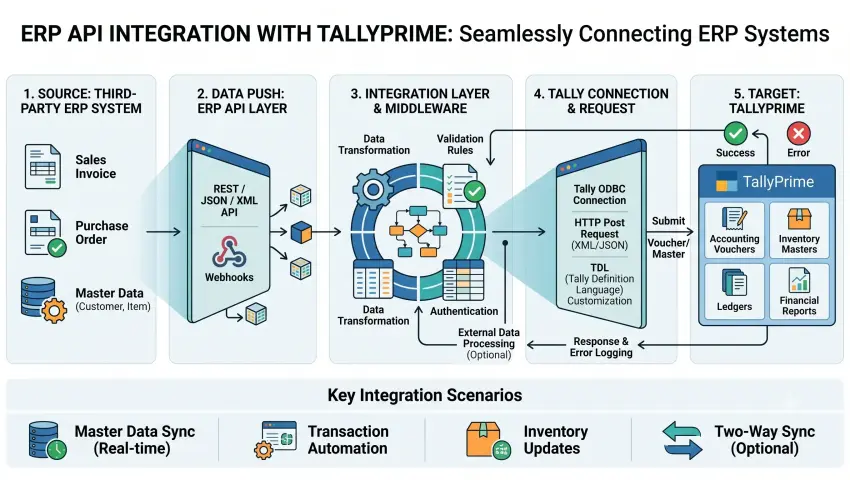
A simplified workflow can look like:
ERP System
↓
API / Integration Layer
↓
TallyPrime
↓
Accounting & Financial Data
The reverse direction can also be implemented when TallyPrime data needs to be made available to the ERP.
For example:
TallyPrime → API → ERP
This allows businesses to define which information should be exchanged and under what conditions.
How TallyPrime ERP Integration Works
A typical integration process involves several stages.
1. Data Creation
A transaction is created in the ERP system.
For example:
- Sales order
- Purchase order
- Customer
- Product
- Invoice
2. API Request
The integration system receives the required information through the ERP's API or another supported connection method.
3. Data Validation
The integration layer checks whether the information meets predefined requirements.
4. Data Mapping
ERP fields are mapped to the corresponding TallyPrime fields.
For example:
| ERP Data | TallyPrime Data |
|---|---|
| Customer | Ledger |
| Product | Stock Item |
| Sales Order | Sales Transaction |
| Purchase | Purchase Transaction |
| Payment | Receipt / Payment |
| Tax Information | Applicable Tax Details |
5. TallyPrime Processing
The required information is transferred into the appropriate TallyPrime workflow.
6. Response & Monitoring
The integration can record whether the transaction was successfully processed or whether an error needs attention.
What Data Can Be Integrated with TallyPrime?
The exact data depends on the ERP and business requirements.
Common integration requirements include:
Customer Data
Customer information can be synchronized between the ERP and TallyPrime.
Possible fields include:
- Customer name
- Address
- Contact details
- GST information
- Customer category
- Billing information
Product Data
Product information can also be connected.
This may include:
- Product name
- SKU
- Item code
- Unit
- Tax information
- Pricing
- Inventory information
Sales Transactions
Sales-related information can be transferred from the ERP to TallyPrime based on the required workflow.
Purchase Transactions
Purchase orders and related transaction information can also be integrated where required.
Invoice Data
Invoice information can be synchronized between connected systems.
Payment Information
Payment and receipt-related information may also be connected to provide better visibility across business operations.
ERP API Integration vs Manual Data Entry
| Area | Manual Process | API Integration |
|---|---|---|
| Customer creation | Repeated entry | Data can be synchronized |
| Sales data | Manual transfer | API-based workflow |
| Invoice processing | Re-entry required | Automated workflow possible |
| Data validation | Manual | Rule-based |
| Excel dependency | Higher | Can be reduced |
| Error handling | Manual checking | System-based monitoring |
| Scalability | More manual effort | Better suited for growing workflows |
API integration does not automatically mean every process becomes fully automated. The actual level of automation depends on the systems, APIs and business rules implemented.
Benefits of TallyPrime ERP Integration
1. Reduce Repetitive Work: Employees can spend less time entering the same business information into multiple systems.
2. Improve Data Consistency: Defined mapping and validation rules can help maintain consistency between connected applications.
3. Faster Accounting Workflow: Sales, purchase and transaction information can move into the accounting workflow according to predefined rules.
4. Reduce Excel Dependency: Businesses can reduce repetitive spreadsheet-based data transfer between departments.
5. Better Operational Visibility: Connecting ERP and accounting systems can help teams access relevant information across business functions.
6. Support Business Automation: Integration becomes a foundation for broader Tally automation, allowing TallyPrime to participate in automated business workflows.
ERP Integration Services for Different Business Requirements
Every business has a different software environment.
A company might use:
ERP + TallyPrime + CRM + Website + Payment Gateway
Another business might use:
E-commerce + Inventory + TallyPrime + CRM
Therefore, an ERP integration service should begin with understanding the existing workflow.
The integration architecture can then be designed around:
- Business processes
- Data requirements
- API availability
- Transaction volume
- Synchronization frequency
- Security requirements
- Error handling
- Hosting environment
Tally API Integration for Business Automation
Tally API integration can be used when TallyPrime needs to communicate with external business applications.
For example:
Website → TallyPrime
An e-commerce website receives an order.
↓
Order information is processed.
↓
Relevant transaction data is transferred to TallyPrime.
CRM → TallyPrime
A customer is created in the CRM.
↓
Customer information is validated.
↓
Relevant customer data is transferred to TallyPrime.
ERP → TallyPrime
An ERP creates a sales transaction.
↓
API integration processes the transaction.
↓
Required accounting information is transferred to TallyPrime.
These workflows can be customized according to business requirements.
Step-by-Step ERP Integration Process
Step 1: Business Requirement Analysis: First, identify the systems currently being used and understand how data moves between departments.
Questions include:
- What ERP is being used?
- Which TallyPrime environment is being used?
- What data needs to be synchronized?
- Which system is the source of truth?
- How frequently should data move?
This step is important because different systems may use different names, formats and structures.
Step 3: API & Architecture Planning: The integration architecture is selected based on the available APIs and business workflow.
Possible components may include:
- ERP API
- TallyPrime connection
- Middleware
- Authentication
- Data validation
- Error logging
Step 5: Testing: The integration should be tested using realistic scenarios such as:
- New customer
- New product
- Sales transaction
- Purchase transaction
- Invoice
- Payment
- Failed transaction
Step 7: Monitoring: The system should be monitored for:
- Failed transactions
- Duplicate records
- Missing fields
- API errors
- Synchronization issues
Common ERP + TallyPrime Integration Challenges
A proper field-mapping strategy is therefore required.
When Should You Consider ERP API Integration?
ERP API integration can be useful when your business:
- Uses TallyPrime alongside an ERP
- Re-enters the same information into multiple systems
- Depends heavily on Excel for data transfer
- Has a large number of daily transactions
- Needs faster sales-to-accounting workflows
- Wants to reduce repetitive accounting work
- Needs connected reporting
- Plans to automate multiple business processes
ERP Integration for Growing Businesses
As transaction volume increases, manual data transfer becomes more difficult to manage.
A connected architecture can help businesses create a more scalable workflow.
For example:
Sales Team
→ CRM / ERP
→ API Integration
→ TallyPrime
→ Financial Reports
→ Business Dashboard
This creates a connected flow from operational activity to accounting and reporting.
Why Pragyantra for Tally API & ERP Integration?
Pragyantra works on Tally integration, Tally API integration, ERP integration services and business automation solutions.
The approach starts with understanding the client's existing software environment and business process before designing the integration workflow.
Solutions can be designed for requirements involving:
- TallyPrime integration
- ERP API integration
- CRM integration services
- Website integration
- Tally automation
- Custom API integration
- Data synchronization
- TallyPrime business dashboard
Frequently Asked Questions
What is Tally ERP integration?
Tally ERP integration connects TallyPrime with an ERP or other business application so relevant information can be exchanged between the systems.
Can an ERP be integrated with TallyPrime?
Yes, depending on the ERP platform, available APIs and the required workflow, integration can be developed between an ERP and TallyPrime.
What is Tally API integration?
Tally API integration allows TallyPrime to communicate with external applications through supported integration mechanisms and APIs.
Can CRM and ERP both be connected with TallyPrime?
Yes. A multi-system integration architecture can connect CRM, ERP and TallyPrime according to the required business workflow.
Does ERP integration completely remove manual work?
Not necessarily. It can automate defined processes, while certain approvals, validations or exceptions may still require human involvement.
Is ERP API integration suitable for SMEs?
It can be useful for SMEs when multiple systems are being used and repetitive data transfer is creating operational workload.
Conclusion
Businesses do not need to keep their ERP and accounting systems isolated.
With a properly planned ERP API integration with TallyPrime, businesses can connect operational and accounting workflows, reduce repetitive data transfer and create a more structured flow of information.
The key is not simply connecting two software systems. The integration should be designed around the actual business process, data structure, APIs and accounting requirements.
Need to connect your ERP with TallyPrime?
Talk to Pragyantra about your Tally API integration and ERP integration requirements.
Ready to Connect Your ERP With TallyPrime?
Talk to Pragyantra about your Tally API integration and ERP integration requirements and eliminate repetitive manual data entry across systems.
🏢 Pragyantra Solutions | Helpline: +91 77280 57558 | Web: www.pragyantra.com