How to Backup TallyPrime Data Safely? A Guide to Automated Backup and Recovery
For any business using TallyPrime, accounting data is one of its most important business assets. It contains financial transactions, customer details, supplier records, inventory information, outstanding balances and other essential business information.
Losing access to this data due to accidental deletion, hardware failure, system problems or unexpected events can disrupt daily business operations. That is why maintaining a reliable TallyPrime data backup process is important.
Many businesses still depend on manual backups or irregular copying of company data. Without a structured process, backup files may become outdated, difficult to locate or unavailable when needed. In this guide, we will explain why TallyPrime data backup matters, common backup methods, important precautions and how an automated backup solution can help businesses maintain their accounting data.
Why Is TallyPrime Data Backup Important?
Businesses regularly create and update accounting records in TallyPrime. These records support financial reporting, taxation, inventory management and day-to-day decision-making. If the primary company data becomes unavailable, restoring normal operations may take time.
A proper backup strategy helps businesses maintain additional copies of important data so they can recover information when required.
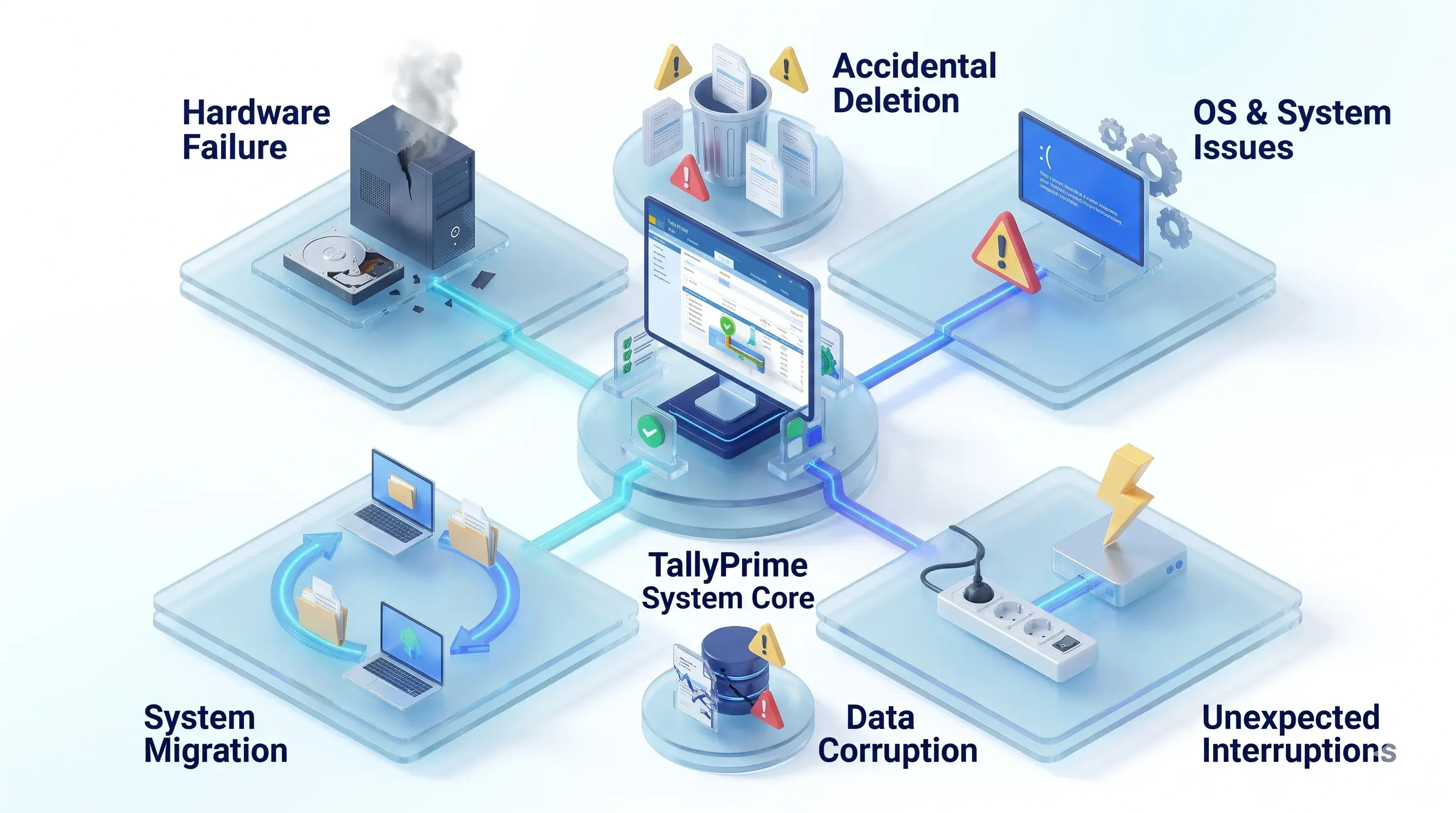
Common Situations Where Backups Become Essential
Computer or hard drive failure.
Accidental deletion of company data.
Operating system or system-related problems.
Unexpected interruptions during business operations.
Data corruption or file accessibility issues.
Moving accounting operations to another computer or environment.
A regular backup routine can reduce the risk of losing access to important accounting records.
What Is TallyPrime Data Backup?
TallyPrime data backup means creating a separate copy of your accounting company data and storing it in a designated backup location.
This backup copy can be used to restore business data if the original data becomes unavailable or needs to be recovered.
Depending on the business setup, backup storage may include:
Local computer storage: Storing snapshots on secondary internal hard drive partitions.
External hard drives: Using portable USB storage devices for manual transfer.
Network storage: Copying records across Network-Attached Storage (NAS) or local servers.
Cloud-based storage solutions: Maintaining secure off-site copies in cloud repositories.
*The right backup method depends on the size of the business, data volume, number of users and recovery requirements.
Common Methods to Backup TallyPrime Data
Businesses can use different approaches to maintain copies of their TallyPrime company data:
1. Manual Backup
In a manual backup process, an authorised user creates a copy of company data and saves it to a selected location.
Advantages:
Simple to understand
Gives users control over when backups are created
Can be suitable for businesses with limited data activity
Limitations:
Depends on users remembering to create backups
May result in outdated backup copies
Requires regular monitoring
Can become difficult to manage as business activity increases
2. Local Backup
A local backup stores a separate copy of company data on a local computer, external drive or designated storage device. It can provide convenient access to backup files.
However, if the primary system and backup device are affected by the same incident, both copies may become unavailable.
3. Cloud Backup
Cloud backup stores copies of important data in a cloud-based storage environment. Depending on the selected service and configuration, it can provide access to backup copies from different locations.
Businesses should evaluate storage security, access permissions, retention policies, connectivity requirements and restoration procedures before choosing a cloud backup solution.
4. Automated Backup
An automated backup process creates backup copies according to a configured schedule. Instead of depending entirely on manual action, businesses can configure backup routines based on their operational requirements.
The schedule may be daily, hourly or another supported frequency, depending on the solution. Automated backup can help maintain a more consistent backup routine.
Manual Backup vs Automated Backup
Evaluate the operational differences between manual file copying and automated backup architecture:
Manual Backup
Automated Backup
Requires user action
Runs according to configured schedules
Depends on user discipline
Reduces dependence on manual reminders
Backup frequency may vary
Can follow a defined schedule
Requires regular checking
Requires monitoring and verification
May become inconsistent
Supports a more structured process
Monitoring & Integrity Verification
Automated backup does not eliminate the need for monitoring. Businesses should regularly verify that backups are completing successfully and that the data can be restored.
Best Practices for TallyPrime Data Backup
Creating a backup is only one part of data protection. Businesses should also follow a few important practices:
1. Define a Backup Schedule
Decide how frequently your business needs to create backup copies. Businesses with frequent accounting transactions may require more frequent backups than businesses with limited daily activity.
2. Maintain Separate Backup Locations
Avoid depending on only one backup location. Where appropriate, maintain separate copies using local and cloud storage options. This can help reduce dependency on a single storage device or location.
3. Verify Backup Files Regularly
Do not assume that a backup is usable simply because a file has been created. Check backup completion status and periodically test the restoration process in a controlled environment.
4. Restrict Access to Backup Data
Backup files may contain confidential financial and business information. Use appropriate access permissions and ensure that only authorised users can access or manage backup data.
5. Maintain a Retention Policy
Decide how long backup copies should be retained. A retention policy helps businesses manage storage requirements and maintain historical backup copies according to their operational needs.
6. Document the Recovery Process
Employees responsible for accounting data should understand how to locate backup files and follow the approved restoration procedure. A documented recovery process can reduce confusion when data needs to be restored.
How Pragyantra's Document Management + Secure Backup Add-on Helps
The solution brings document management and backup capabilities together to help businesses manage important accounting records.
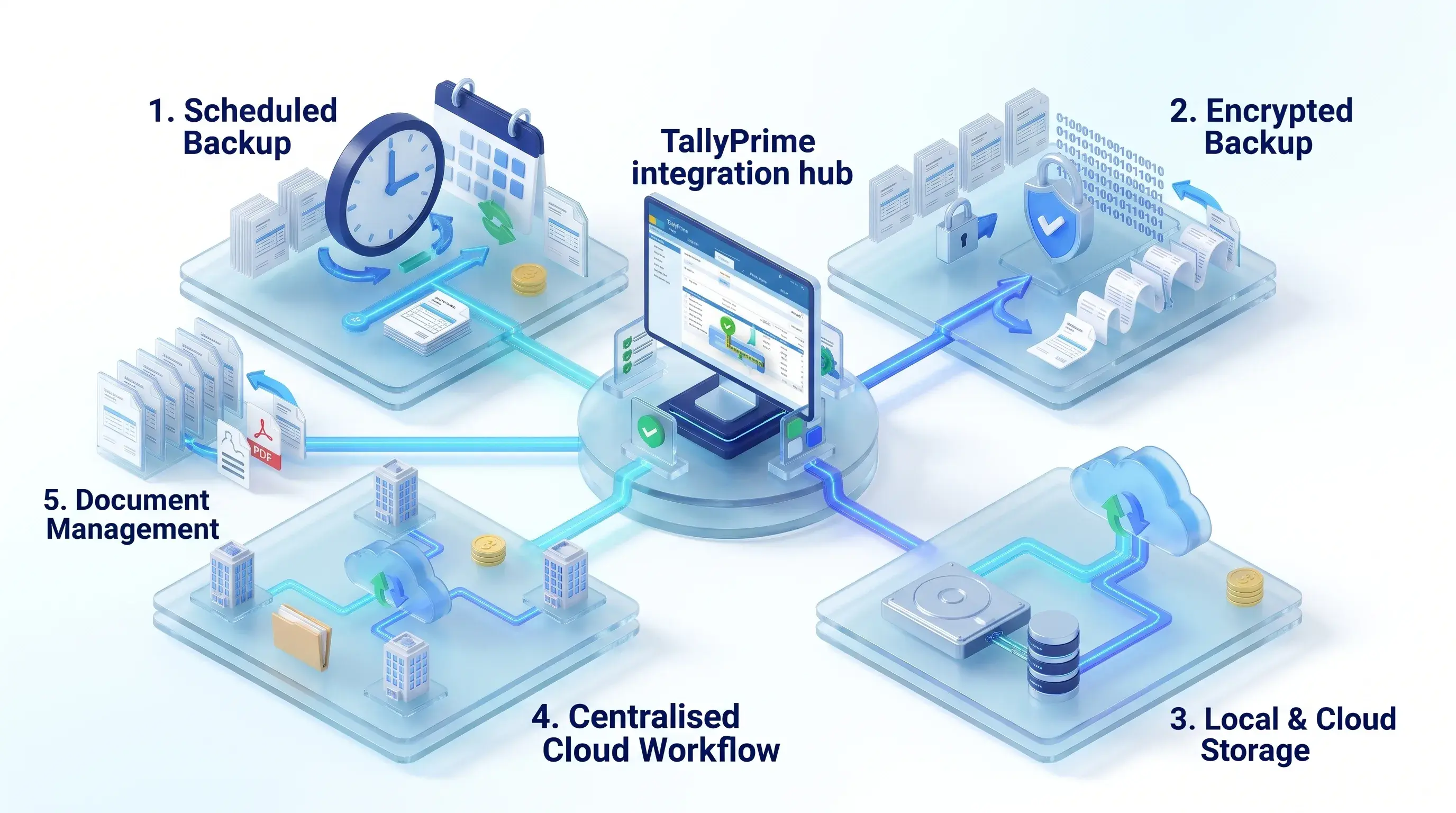
1. Scheduled Backup Support
The product page describes scheduled backup routines, including daily and hourly options. This can help businesses establish a more consistent backup process.
2. Encrypted Backup
The product page describes encrypted backup functionality. Businesses should confirm the encryption implementation and configuration with the Pragyantra technical team.
3. Local and Cloud Backup Options
The add-on is presented with local and cloud backup options, allowing businesses to discuss a suitable storage setup for their requirements.
4. Centralised Backup Workflow
Businesses using Tally on Cloud can discuss a centralised document and backup workflow based on their hosting environment.
5. Document Management Alongside Backup
In addition to backup functionality, the add-on supports document management workflows, helping businesses organise supporting files such as invoices, bills, receipts and other transaction-related documents.
*Note: Actual backup schedules, storage destinations, retention, restore functionality and compatibility depend on the product configuration. Confirm these details before implementation.
Why Should Businesses Combine Document Management and Data Backup?
Document management and data backup address two different requirements:
Document management helps organise business documents and connect them with relevant accounting transactions.
Data backup helps maintain copies of important company information for recovery when needed.
When both are managed through a structured workflow, businesses can improve how they maintain and protect their accounting records. For example:
Supplier invoices can be organised with relevant purchase vouchers.
Payment receipts can be maintained alongside payment records.
Supporting documents can be easier to retrieve.
Company data can be included in a configured backup routine.
Backup and document management requirements can be discussed as part of one solution.
Who Needs a TallyPrime Backup Solution?
Small and Medium Businesses: Businesses that depend on TallyPrime for daily accounting can benefit from a consistent backup routine.
Trading and Distribution Companies: Companies managing frequent sales, purchases, inventory and payment transactions should establish a suitable data backup process.
Manufacturing Businesses: Manufacturers maintain important financial and operational records. A structured backup routine can support their data management practices.
Multi-Branch Businesses: Businesses operating across multiple locations may need a clearly defined backup strategy that considers their company data, hosting environment and access requirements.
Accounting Firms: Accounting professionals managing financial records for multiple clients should maintain appropriate backup and recovery procedures for their working environments.
Frequently Asked Questions
1. How often should I backup TallyPrime data?
Backup frequency depends on how frequently your business creates or updates accounting transactions. Businesses with high transaction volumes may require more frequent backups.
2. Can TallyPrime data be backed up automatically?
Automated backup solutions can create backup copies according to configured schedules. Pragyantra's product page describes scheduled daily and hourly backup options. Confirm the available configuration with the technical team.
3. Is cloud backup better than local backup?
Both have different advantages. Local backup can provide convenient access, while cloud backup can provide an additional storage location. Businesses should evaluate security, accessibility, cost and recovery requirements before selecting an approach.
4. Does backup protect against accidental data loss?
Maintaining backup copies can help recover data if the primary company data becomes unavailable. However, recovery depends on backup availability, data integrity and the restoration process.
5. What is encrypted backup?
Encrypted backup uses encryption to protect stored backup information from unauthorised access. The exact encryption method and implementation should be verified with the solution provider.
6. Can I restore TallyPrime data from a backup?
TallyPrime data can be restored using an appropriate backup and restoration process. The exact steps depend on the backup method, data format and system configuration.
7. Does Pragyantra provide both document management and backup?
Yes. Pragyantra presents this product as a combined Document Management + Secure Backup add-on for TallyPrime.
8. Is the backup add-on compatible with Tally on Cloud?
The product page describes support for Tally on Cloud workflows. Compatibility should be confirmed for the specific hosting provider and technical environment.
Explore Related Pragyantra Solutions
Discover more productivity and data security tools for your TallyPrime workflow:
Protect Your TallyPrime Data with a Structured Backup Process
Your accounting data plays an important role in daily business operations. Depending only on occasional manual backups can create unnecessary risks and make recovery more difficult.
A structured backup strategy, combined with proper document management, can help businesses maintain organised records and improve data protection practices. Pragyantra's Document Management + Secure Backup add-on brings these capabilities closer to your TallyPrime workflow.