

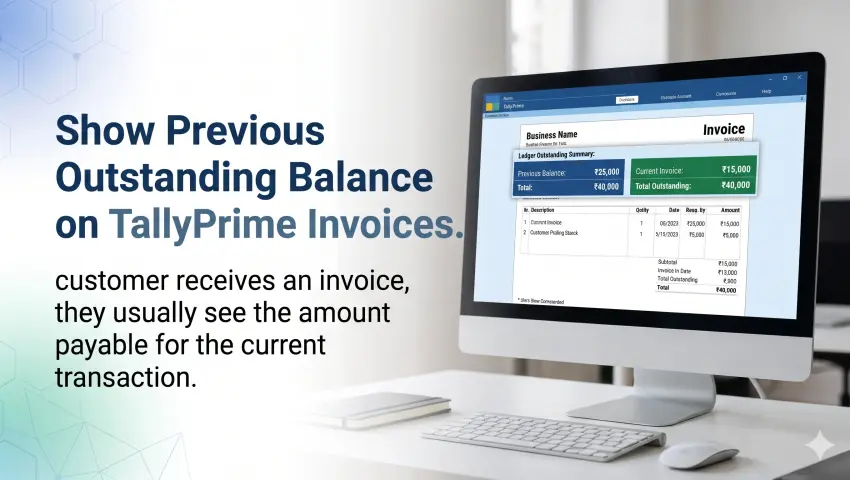

Show Previous Outstanding Balance on TallyPrime Invoices.
When a customer receives an invoice, they usually see the amount payable for the current transaction. But what about the payments that are still pending from previous transactions?
For businesses that sell products or services on credit, showing only the current invoice amount may not provide the complete payment picture. Customers may overlook earlier dues, accounts teams may need to send separate ledger statements, and payment follow-ups can become time-consuming.
A practical way to improve payment visibility is to display the party's previous outstanding balance directly on the invoice.
In this guide, we will explain why previous balance visibility matters, how it can support payment tracking, and how businesses can add this information to their TallyPrime invoice print format using a suitable customization.
Why Should You Show Previous Outstanding Balance on an Invoice?
In businesses that regularly deal with credit sales, customers may have multiple pending invoices at any given time.
For example, a customer may have an earlier outstanding amount of ₹25,000 and receive a new invoice worth ₹10,000. If the invoice displays only the current bill amount, the customer may not immediately notice the previous dues.
Showing the previous outstanding balance helps bring this information to the customer's attention.
Some common challenges include:
- Delayed Payments: Customers may not remember earlier pending amounts when they receive a new invoice.
- Repeated Payment Follow-ups: Accounts teams may need to send separate statements or reminders.
- Lack of Payment Clarity: Customers may see the current invoice amount without understanding their total outstanding.
- Credit Management Challenges: Businesses may find it harder to communicate pending dues during regular transactions.
Displaying previous outstanding information on invoices can make payment communication clearer and more convenient.
What Is Previous Outstanding Balance in TallyPrime?
Previous outstanding balance refers to the amount pending from a customer or supplier before the current transaction is considered.
It gives businesses a view of the party's earlier dues alongside the current invoice.
For example:
| Particulars | Amount |
|---|---|
| Previous Outstanding Balance | ₹25,000 |
| Current Invoice Amount | ₹10,000 |
| Total Outstanding | ₹35,000 |
In this example, ₹25,000 is the previous outstanding amount, while ₹35,000 represents the combined amount after adding the current invoice.
Please Note
These figures are illustrative. Actual outstanding calculations depend on the party ledger and applicable accounting entries.
How to Show Previous Balance on TallyPrime Invoices?
TallyPrime provides accounting and invoicing functionality, but businesses may need a customized invoice print format to display additional party balance information in the required position.
A Tally customization or add-on can help extend the invoice format with fields such as:
- Previous Outstanding Balance
- Current Invoice Amount
- Total Outstanding Balance
With Pragyantra's Enable Party's Previous Balance in Invoice Print add-on, businesses can configure the invoice print format to display the party's previous outstanding balance.
The add-on is designed to fetch the party's outstanding information from the ledger at the time of printing and present it in the invoice.
Product details:Enable Party's Previous Balance in Invoice Print
Key Features of Previous Balance in Invoice Print Add-on
1. Display Previous Outstanding Balance
Show the pending amount from earlier transactions directly on the invoice, helping customers understand their existing dues.
2. Show Total Outstanding Amount
Display the previous balance along with the current invoice amount to provide a combined outstanding figure.
3. Customizable Invoice Display
The balance information can be positioned in the invoice layout according to business requirements, such as above the invoice total, in the footer, or in a separate information section.
4. Updated Ledger Information
The add-on is designed to retrieve the latest outstanding information from the party ledger when the invoice is printed.
5. Flexible Display Options
Businesses can configure the display according to their requirements, including showing previous outstanding or the final closing balance.
6. Customized Invoice Integration
The balance field can be integrated into an existing customized invoice format, subject to technical review and compatibility.
Business Benefits of Showing Previous Balance on Invoices
Better Payment Awareness
Customers can see their earlier pending dues while reviewing a new invoice. This makes outstanding information easier to notice.
More Transparent Communication
Showing previous balance and current invoice value together helps customers understand how their total payable amount is calculated.
Reduced Manual Follow-ups
When outstanding information is visible on invoices, accounts teams may spend less time explaining earlier pending amounts separately.
Improved Receivables Management
Businesses can use invoice-level balance visibility as an additional way to communicate pending payments and support their collection process.
Better Customer Experience
Providing clear financial information can help reduce confusion and support smoother communication between businesses and customers.
Which Businesses Can Benefit from This TallyPrime Add-on?
This functionality can be useful for businesses that regularly manage credit transactions and outstanding payments.
Wholesalers and Distributors
Businesses dealing with retailers on credit can display previous dues with new invoices, making payment communication easier.
Traders and Suppliers
Companies handling frequent orders from repeat customers can provide better visibility of pending balances.
Manufacturers
Manufacturers supplying goods to dealers or distributors can make outstanding information more visible during regular billing.
Service Providers
Businesses that issue recurring bills can use previous balance visibility to communicate earlier unpaid amounts along with the current invoice.
Previous Balance vs Total Outstanding: What Is the Difference?
These two terms are related but represent different amounts.
| Term | Meaning |
|---|---|
| Previous Outstanding | Amount pending before the current invoice |
| Current Invoice Amount | Amount charged in the latest invoice |
| Total Outstanding | Previous outstanding plus the current invoice amount, subject to applicable adjustments |
For example, if a customer has ₹25,000 pending and receives a new invoice of ₹10,000, the previous outstanding remains ₹25,000, while the combined amount becomes ₹35,000.
Keeping these values separate helps avoid confusion between earlier dues and the current transaction.
How Pragyantra Helps Add Previous Balance to TallyPrime Invoices
Pragyantra provides the Enable Party's Previous Balance in Invoice Print add-on for businesses that want to display party outstanding information in their invoice print format.
The implementation can be planned around your existing invoice layout and business requirements.
A typical process includes:
Implementation Process
- Requirement Discussion: Understand your current invoice format and balance display requirements.
- Technical Review: Check the Tally version, existing customization, and required voucher types.
- Add-on Configuration: Configure the previous outstanding and total outstanding fields as required.
- Invoice Testing: Verify the displayed figures against the party ledger.
- Implementation Support: Complete the setup after the required checks.
The exact display options and supported voucher types should be confirmed with the Pragyantra technical team before implementation.
Frequently Asked Questions (FAQs)
1. Can I show a customer's previous outstanding balance on a TallyPrime invoice?
Yes. Pragyantra's add-on is designed to display the party's previous outstanding balance in the invoice print format.
2. Does previous balance include the current invoice amount?
No. Previous outstanding refers to the amount pending before the current invoice. A separate total outstanding figure can be configured to include the current invoice amount.
3. Can I show both previous balance and total outstanding?
Yes. The add-on supports displaying previous outstanding and a combined total outstanding figure, depending on the selected configuration.
4. Can I customize the position of the balance on the invoice?
Yes. The display position can be configured according to the invoice layout and business requirements.
5. Can I show a NIL balance when there are no previous dues?
The product page states that the default configuration displays the balance when it is greater than zero. A NIL Balance display can be customized if required.
6. Can I hide the balance for selected customers?
Yes. The product page describes configuration options for displaying balances only for selected ledger groups or categories.
7. Does this add-on work with customized invoice formats?
It can be integrated into existing customized invoice templates, subject to technical review.
8. Is the add-on compatible with TallyPrime?
The product page lists compatibility with TallyPrime and Tally ERP 9. Confirm your specific version and existing setup with Pragyantra before installation.
Make Outstanding Balances Visible on Every Invoice
Managing customer payments becomes easier when outstanding information is communicated clearly.
Instead of relying only on separate ledger statements and repeated reminders, businesses can display previous outstanding balances alongside the current invoice using a customized TallyPrime invoice format.
With Pragyantra's Enable Party's Previous Balance in Invoice Print add-on, you can improve invoice transparency and make payment information more accessible to your customers.
Want to add previous outstanding balance to your TallyPrime invoices?
Contact Pragyantra to discuss your invoice requirements and request a product demo.
🏢 Pragyantra Solutions | Phone: +91 77280 57558 | Web: www.pragyantra.com
TallyPrime Invoice Customisation | Outstanding Management | Pragyantra