


TallyPrime Integration with Payment Gateway: Automate Payments, Reconciliation & Accounting
Online payments have become an important part of modern business operations.
Customers may pay through payment gateways, UPI, cards, net banking, wallets or other digital payment methods. But receiving a payment is only one part of the process.
The finance team also needs to know:
- Which customer paid?
- Which invoice was paid?
- What was the payment amount?
- Was the payment successful?
- Was it refunded?
- Was a transaction reversed?
- What fees were deducted?
- Has the payment been reconciled with the accounting record?
When payment systems and accounting software operate separately, finance teams may have to download transaction reports, compare them with invoices and manually update records.
This is where TallyPrime Integration with Payment Gateway can help.
A structured integration can connect payment transaction data with TallyPrime and create a more organized payment-to-accounting workflow.
The exact implementation depends on the payment gateway, TallyPrime environment, transaction volume, accounting process and reconciliation requirements. Explore our core TallyPrime ERP Integration Servicesfor comprehensive operational connectivity.
💡 Quick Answer: What Is TallyPrime Integration with a Payment Gateway?
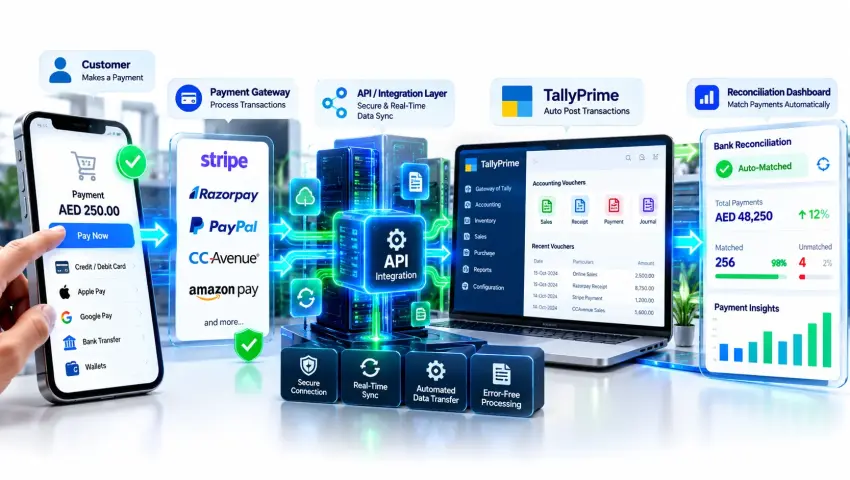
TallyPrime Integration with a Payment Gateway means creating a connection between an online payment platform and TallyPrime so that relevant payment and transaction information can be exchanged between the systems.
A typical architecture can look like:
↓
Payment Gateway
↓
Integration Layer
↓
Validation & Mapping
↓
TallyPrime
↓
Accounting / Reconciliation
Depending on the business requirement, the integration can help process information related to:
- Payment transactions
- Customer references
- Invoice references
- Payment status
- Refunds
- Transaction IDs
- Settlement information
- Reconciliation data
The objective is not simply to transfer payment data. The goal is to create a reliable connection between payment collection and accounting workflows.
Why Integrate a Payment Gateway with TallyPrime?
A payment gateway can confirm that a customer has made a payment, but the accounting team still needs to record and reconcile that transaction correctly.
Without integration, a typical workflow might look like:
For businesses processing a large number of transactions, this can become difficult to manage.
A connected workflow can potentially reduce repetitive steps.
Common Problems Without Payment Integration
1. Manual Transaction Matching
Finance teams may need to manually match payment transactions with invoices or customers.
2. Reconciliation Delays
Payment reports may need to be downloaded and compared periodically.
3. Duplicate Data Entry
The same transaction information may exist in the payment gateway, Excel and accounting software.
4. Refund Tracking
Refunds and reversals may need separate manual tracking.
5. Payment Status Gaps
The payment gateway may show one status while the accounting record has not yet been updated.
6. Settlement Differences
The customer payment amount and settlement amount may differ because of applicable charges or adjustments.
7. High Transaction Volume
As transaction volume grows, manual reconciliation becomes increasingly time-consuming.
How Does Payment Gateway Integration with TallyPrime Work?
A typical payment integration architecture can look like:
↓
API / Integration Method
↓
Integration Layer
↓
Transaction Mapping
↓
Validation
↓
TallyPrime
↓
Accounting / Reconciliation
The integration layer can perform several functions:
- Receive transaction data
- Identify customers
- Match invoice references
- Validate transaction information
- Transform data
- Send relevant information to TallyPrime
- Record synchronization status
- Handle exceptions
The exact architecture depends on the gateway and the required accounting workflow. To configure webhooks and custom endpoints, explore our Tally API Integration Services.
Payment Gateway → TallyPrime Data Flow
A basic workflow could be:
↓
Payment Gateway
↓
Successful Transaction
↓
Transaction Reference
↓
Integration Layer
↓
Invoice / Customer Matching
↓
TallyPrime
↓
Accounting Record
This allows the business to define a structured path from payment collection to accounting.
However, the exact accounting treatment should be defined according to the business's accounting process.
What Payment Data Can Be Integrated with TallyPrime?
The required fields vary by business. Possible data elements include:
| Payment Data | Possible Accounting Use |
|---|---|
| Transaction ID | Payment reference |
| Customer ID | Customer mapping |
| Invoice Number | Invoice matching |
| Payment Amount | Payment record |
| Payment Date | Transaction date |
| Payment Status | Status tracking |
| Payment Method | Payment classification |
| Refund Status | Refund processing |
| Gateway Reference | Transaction tracking |
| Settlement Amount | Reconciliation |
Not every payment gateway will provide every field in the same format. Therefore, data availability should be checked before integration development.
Payment Status Synchronization
Payment status is one of the most important parts of an integration:
The business may need different actions depending on the status:
- Successful: Process accounting workflow
- Failed: Do not treat as successful payment
- Refunded: Process refund workflow
- Pending: Keep transaction under review
The exact business rules should be defined before automation.
Invoice-to-Payment Matching
One of the most useful workflows is matching a payment to the correct invoice.
For example:
↓
Payment Gateway: Transaction #XYZ123
↓
Payment Amount: ₹25,000
↓
Integration Layer
↓
Matching Rules
↓
TallyPrime
The matching can be based on available references such as invoice number, customer reference, transaction ID, order ID, or payment reference.
Payment Reconciliation with TallyPrime
Payment reconciliation means comparing payment information with accounting records to identify whether transactions have been correctly accounted for.
A simplified reconciliation workflow:
↓
Data Matching
↓
Matched Transactions + Unmatched Transactions
↓
Reconciliation
This helps identify missing transactions, duplicate transactions, amount differences, unmatched payments, refunds, and settlement differences.
Why Payment Reconciliation Is Important
Suppose an online business receives 500 payments in a month. The payment gateway shows 500 transactions, while the accounting system contains 492 corresponding records.
The difference needs investigation for reasons such as:
- Failed synchronization
- Duplicate data
- Refund
- Payment reversal
- Incorrect reference
- Data mapping issue
- Manual adjustment
A reconciliation workflow helps isolate these variances systematically.
Payment Gateway Settlement vs Customer Payment
One important concept in payment integration is that:
For example, a customer may pay ₹10,000, but the amount settled to the business bank account may differ due to gateway processing charges or adjustments.
Therefore, a payment integration distinguishes between:
Transaction Amount: Amount paid by the customer.
Gateway Charges: Applicable payment processing fees/MDR.
Refunds / Adjustments: Amounts returned or adjusted.
Settlement Amount: Net amount credited to the business bank account.
Payment Integration for Different Business Models
E-commerce Businesses
Customer → E-commerce Website → Payment Gateway → Order + Payment Data → Integration Layer → TallyPrime
Connects order IDs, customers, invoices, refunds, product items, and settlements directly into TallyPrime. For store-wide workflows, check our E-commerce Integration with TallyPrimeguide.
Service Businesses
Customer → Invoice / Payment Link → Payment Gateway → Successful Payment → TallyPrime
Connects online link collections for consulting, subscriptions, and retainers with client billing records.
B2B Businesses
Customer → Invoice → Payment → TallyPrime → Outstanding
Handles high-value receipts, partial payments, credit adjustments, and corporate receivables.
Payment Gateway + TallyPrime + CRM
A broader architecture connects sales pipelines, payment collections, and accounting ledgers:
This creates an end-to-end Lead → Customer → Sale → Invoice → Payment → Accounting flow. View our CRM Integration with TallyPrimepage for setup specifics.
Payment Gateway + TallyPrime + Business Dashboard
Payment data can also become part of a centralized executive dashboard:
TallyPrime ───────┼──→ Business Dashboard
CRM ──────────────┘
A centralized dashboard displays:
- Total collections
- Successful vs failed transactions
- Pending settlement pipelines
- Refund volumes
- Outstanding receivables
- Collection trends over time
Bring payment intelligence together using Business Intelligence Tools in Dubai & UAE.
Real-Time vs Scheduled Payment Synchronization
Real-Time / Near Real-Time: Useful when instant order fulfillment or invoice clearance is needed upon successful customer payment.
Scheduled Synchronization: Ideal for batched end-of-day accounting updates where transactions sync hourly or daily.
Reconciliation-Based Workflow: Designed for periodic settlement matching against bank deposits rather than booking every transaction individually.
How to Implement Payment Gateway Integration with TallyPrime
Common Payment Integration Mistakes
Payment Gateway Integration vs Manual Reconciliation
| Manual Reconciliation | Integrated Workflow |
|---|---|
| Download payment report | Structured transaction flow |
| Match invoices manually | Defined matching rules |
| Copy payment details | Automated transfer where configured |
| Track refunds manually | Refund workflow can be mapped |
| Multiple spreadsheets | Centralized transaction processing |
| Higher repetitive effort | Reduced manual processing |
| Manual exception tracking | Integration logs / exception handling |
The objective is to reduce repetitive work while maintaining strict accounting controls.
Benefits of TallyPrime Payment Gateway Integration
Reduce Manual Data Entry: Relevant payment information can be transferred without repeated copy-paste.
Improve Reconciliation: Defined matching rules can help identify corresponding transactions.
Improve Payment Visibility: Finance teams can have a more structured view of payment activity.
Reduce Repetitive Work: Regular payment-processing tasks can be streamlined.
Connect Sales and Accounting: Payment data can become part of the broader sales-to-accounting workflow.
Support Business Growth: A structured architecture can be expanded as transaction volume and systems increase.
Who Should Consider Payment Gateway Integration?
E-commerce Businesses: Processing large volumes of online orders and marketplace sales.
Subscription Businesses: Managing recurring online payments and renewal cycles.
Service Companies: Collecting client retainer and project invoices online.
B2B Businesses: Managing invoice payment links and digital settlements.
Retail Businesses: Unifying POS, online channels, and digital payment collections.
Growing SMEs: Scaling beyond spreadsheets where manual matching causes operational strain.
When Is Payment Integration Not Necessary?
If your business has very low payment volume, simple cash/cheque workflows, minimal reconciliation requirements, and no repetitive manual friction, a complex API integration may not provide sufficient ROI.
How Much Does TallyPrime Payment Gateway Integration Cost?
Pricing depends on technical variables: the gateway used, TallyPrime environment, API methods, transaction volume, refund logic, reconciliation complexity, CRM connectivity, and reporting requirements. A technical discovery is completed before estimating project cost.
Frequently Asked Questions
Can a payment gateway be integrated with TallyPrime?
Yes, a payment gateway and TallyPrime can be connected through an appropriate integration architecture when the required technical capabilities and business workflow support it.
Can online payments automatically update TallyPrime?
A workflow can be designed to transfer relevant payment information to TallyPrime, depending on the payment gateway, integration method and accounting requirements.
Can payment status be synchronized with TallyPrime?
Payment status can be included in an integration workflow when the required transaction information is available.
Can payment gateway transactions be matched with invoices?
Yes, invoice-to-payment matching can be designed using available references such as invoice number, order ID, transaction ID or other business-defined identifiers.
Can refunds be integrated with TallyPrime?
Refunds can be included in the integration design, but the exact accounting treatment depends on the gateway, business policy, and voucher setup.
How does payment gateway integration help with reconciliation?
It automatically maps gateway transaction reports against sales vouchers and bank accounts, highlighting unmatched items, charge deductions, and settlement differences.
Conclusion
Payment gateways confirm customer payments, but finance teams still need reliable reconciliation in TallyPrime. Connecting payment gateways with TallyPrime creates an automated, structured bridge between transaction data and accounting ledgers.
A successful payment integration focuses on:
Aligning integration architecture with actual financial controls allows businesses to scale digital transaction volumes with confidence.
Internal Linking Plan
| Section | Anchor Text | URL |
|---|---|---|
| Main Commercial Hub | TallyPrime ERP Integration Services | /tallyprime-erp-integration |
| API Integration Hub | Tally API Integration Services | /tally-api-integration-services |
| E-commerce Cluster | E-commerce Integration with TallyPrime | /blog/ecommerce-integration-with-tallyprime |
| CRM Cluster | CRM Integration with TallyPrime | /crm-integration-services-tallyprime |
| BI Dashboard Hub | Business Intelligence Tools in Dubai & UAE | /business-intelligence-tools-dubai |
Ready to Connect Your Payment Gateway with TallyPrime?
Eliminate manual transaction matching, sync payment statuses in real time, and streamline bank reconciliations across your business applications.
🏢 Pragyantra Solutions | Helpline: +91 77280 57558| Web: www.pragyantra.com