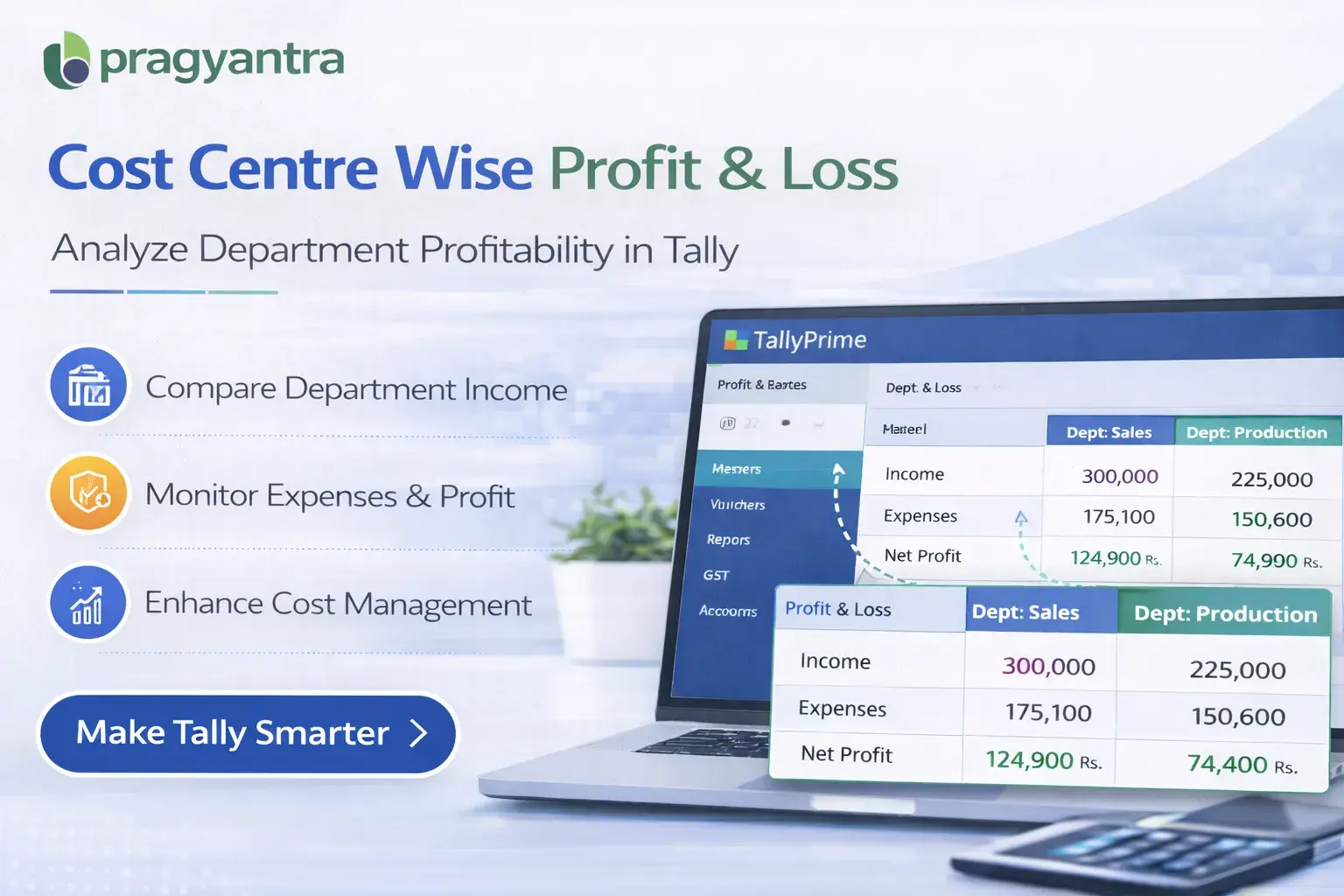
Enable Cost Centre Wise Profit & Loss Account for TallyPrime
Analyze Profit & Loss by Department, Branch, or Project in Tally
Introduction
Businesses often need to analyze their financial performance across different departments, branches, or projects. In TallyPrime, cost centres help organizations track expenses and income related to specific business units. However, the standard Profit & Loss report in Tally usually provides an overall financial summary without showing cost centre wise profitability.
The Enable Cost Centre Wise Profit & Loss Account Add‑on developed by Pragyantra enhances the Profit & Loss report by allowing businesses to generate Profit & Loss statements based on cost centres.
With this add‑on, companies can easily evaluate department-wise profitability, project-wise financial performance, and branch-wise revenue analysis, helping management make better business decisions.
What is “Enable Cost Centre Wise Profit & Loss Account”?
The Enable Cost Centre Wise Profit & Loss Account Add‑on is a custom Tally module that allows businesses to generate Profit & Loss reports based on cost centres.
Normally, the Profit & Loss report in Tally shows Total Income, Total Expenses, Gross Profit, and Net Profit, but it does not clearly show profitability for each cost centre. With this add‑on installed, businesses can view:
- Cost Centre Wise Income
- Cost Centre Wise Expenses
- Department Wise Profitability
- Project Wise Financial Performance
This makes it easier to analyze financial performance for each business unit.
Why Businesses Need This Add‑on
Many organizations operate with multiple departments or projects, and they need to measure profitability separately for each operational unit. Without cost centre wise Profit & Loss reports, businesses may face challenges such as:
- Difficulty analyzing department profitability
- Limited visibility of project financial performance
- Time‑consuming financial analysis
- Lack of detailed management reports
The Pragyantra Cost Centre Wise Profit & Loss Add‑on solves these problems by providing detailed profitability analysis directly in the Profit & Loss report.
Key Features of the Add‑on
Cost Centre Wise Profit & Loss Report
The add‑on enables businesses to generate Profit & Loss reports based on individual cost centres.
Department Wise Profitability Analysis
Organizations can analyze revenue and expenses for different departments efficiently.
Project Wise Financial Tracking
Businesses running multiple projects can evaluate profitability for each project separately.
Improved Financial Reporting
Accountants can produce detailed financial reports that support better decision‑making for the management.
Lightweight and High Performance
Built using optimized TDL architecture, ensuring smooth performance without affecting Tally speed.
Business Benefits
- Better Profitability Insights: Clearly see which departments or projects generate the most profit.
- Improved Financial Control: Track expenses and income for each operational unit accurately.
- Faster Decision Making: Detailed reports help owners make better strategic business decisions.
- Efficient Business Monitoring: Companies can monitor financial performance across multiple cost centres.
Use Cases
- Manufacturing Companies: Where different production departments operate as separate cost centres.
- Service Organizations: Where projects are tracked separately for profitability analysis.
- Businesses with Multiple Branches: Where each branch needs a separate financial P&L.
- Accounting Firms: Where detailed financial reporting is required for various clients.
Compatibility
This add‑on works with:
✔ TallyPrime
✔ Tally ERP 9
Frequently Asked Questions (FAQ)
1. Can I see the Net Profit for a specific project using this add-on?
Yes, this add-on allows you to filter your Profit & Loss statement by cost centres, showing you the exact Net Profit or Loss for each project or department.
2. Does it provide a comparative view of different cost centres?
Yes, you can generate reports that show side-by-side profitability for multiple cost centres, helping you compare performance across business units.
3. Is this add-on compatible with TallyPrime?
Absolutely. It is fully compatible with TallyPrime (all releases) and Tally ERP 9.
4. Will it affect my overall Company P&L report?
No, it enhances your reporting capabilities without changing your original data. You can still view your standard consolidated Profit & Loss account whenever needed.
Identify Your Most Profitable Business Units
Stop guessing about your project's success. Get precise, cost centre-wise profitability reports with Pragyantra today.
👉 Contact Pragyantra today for Tally Customization & Automation that grows your business.