Enable Due Date Wise Outstanding Report for TallyPrime
Track Customer Outstanding Based on Due Dates in Tally
Introduction
Managing outstanding payments efficiently is critical for maintaining healthy cash flow in any business. Accountants and finance teams often need to track customer outstanding balances based on invoice due dates in order to prioritize payment follow‑ups and manage receivables effectively.
However, the default Outstanding Report in TallyPrime does not always provide a clear due date‑wise view of pending payments, making it difficult to quickly identify overdue invoices.
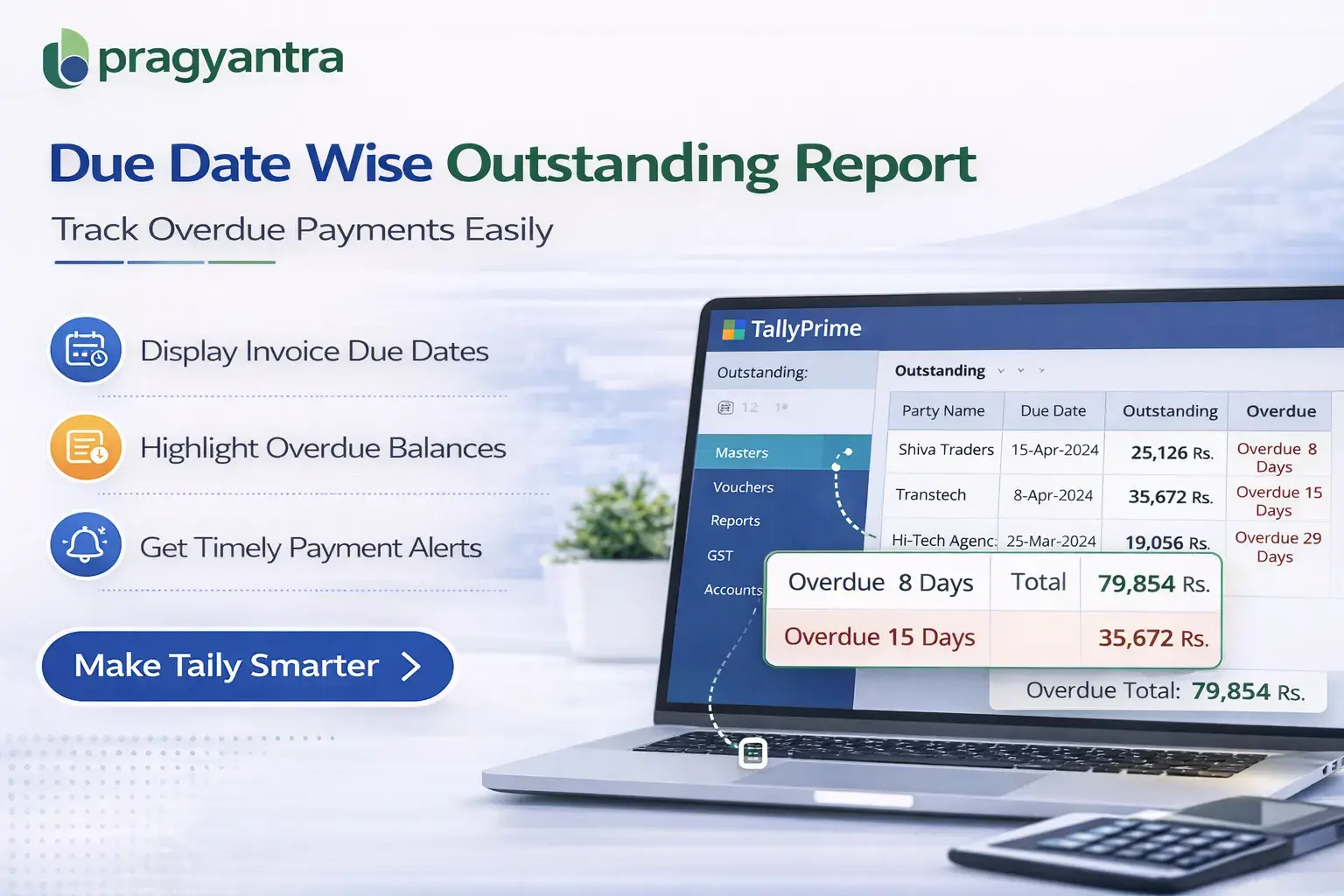
The Enable Due Date Wise Outstanding Report Add‑on developed by Pragyantra enhances the outstanding report by displaying outstanding balances categorized according to their due dates.
With this add‑on, businesses can easily identify which invoices are overdue, due soon, or pending, allowing them to manage receivables more efficiently and improve payment collection.
What is “Enable Due Date Wise Outstanding Report”?
The Enable Due Date Wise Outstanding Report Add‑on is a custom Tally module that modifies the outstanding report to display customer outstanding balances based on invoice due dates.
Normally, the outstanding report shows details such as:
- Customer name
- Invoice number
- Invoice date
- Pending amount
But it may not clearly categorize outstanding balances according to due dates.
With this add‑on installed, the outstanding report includes additional information such as:
- Invoice Due Date
- Overdue Days
- Due Date Based Outstanding Analysis
This helps businesses quickly identify overdue invoices and prioritize payment follow‑ups.
Why Businesses Need This Add‑on
Many companies sell products or services on credit terms, meaning customers are expected to pay invoices within a specific number of days.
Without a due date‑wise outstanding report, accountants must manually analyze invoices to determine which payments are overdue.
This can create problems such as:
- Difficulty identifying overdue invoices
- Delayed payment follow‑ups
- Inefficient receivable management
- Reduced financial visibility
The Pragyantra Due Date Wise Outstanding Add‑on solves these issues by providing a clear due date‑based analysis of outstanding balances.
Key Features of the Add‑on
Due Date Based Outstanding Analysis
The add‑on displays outstanding balances categorized according to their invoice due dates, helping businesses monitor overdue payments easily.
Overdue Payment Identification
Accountants can quickly identify which invoices are overdue and require immediate follow‑up.
Improved Receivable Management
Businesses can manage customer payments more efficiently by tracking due dates.
Lightweight and High Performance
The module is developed using optimized TDL architecture, ensuring smooth performance without affecting the speed of Tally.
Easy Installation and Configuration
Pragyantra provides quick installation and configuration so businesses can start using the feature immediately.
Business Benefits
- Faster Payment Follow‑Ups: Finance teams can quickly identify overdue invoices and contact customers for payment.
- Better Cash Flow Management: Businesses gain better control over receivables by monitoring payment due dates.
- Improved Financial Visibility: Due date‑based outstanding reports provide better insights into pending payments.
- Efficient Credit Control: Businesses can manage credit terms and customer payment behavior more effectively.
Use Cases
- Trading Businesses: Where invoices are issued on credit and payments must be tracked by due date.
- Distribution Companies: Where multiple customers have different credit periods.
- Manufacturing Companies: Where receivable management is critical for cash flow.
- Accounting Departments: Where finance teams monitor outstanding balances regularly.
Compatibility
This add‑on works with:
✔ TallyPrime
✔ Tally ERP 9
FAQ
What is the Due Date Wise Outstanding Report in Tally?
It is a Tally add-on that organizes your outstanding reports based on invoice due dates, making it easier to see what is overdue.
Can I see how many days an invoice is overdue?
Yes, the add-on clearly displays overdue days alongside each invoice for better tracking.
Is this add-on compatible with TallyPrime?
Yes, it is fully compatible with TallyPrime as well as Tally ERP 9.
How does this improve cash flow?
By highlighting overdue payments, it allows your team to prioritize collections and bring in cash faster.
Stop Chasing Payments Blindly
Prioritize your collections with our Due Date Wise Outstanding Report and improve your business cash flow.
👉 Contact Pragyantra today for Tally Customization & Automation.